AI API 101 — the free Pandev key, from zero to your first call
You have probably used an AI chatbot by typing into a website. An AI API is the same brain, but without the website — your code talks to it directly. That is how bots answer questions, how apps summarize text, how a Discord bot in the Pandesal server can explain homework at 2 AM.
Pandev members get a free AI API key — real access to a serious LLM, no credit card, no approval queue. This guide assumes you have never written a line of API code. By the end you will have made a call yourself.
What "an API" actually is
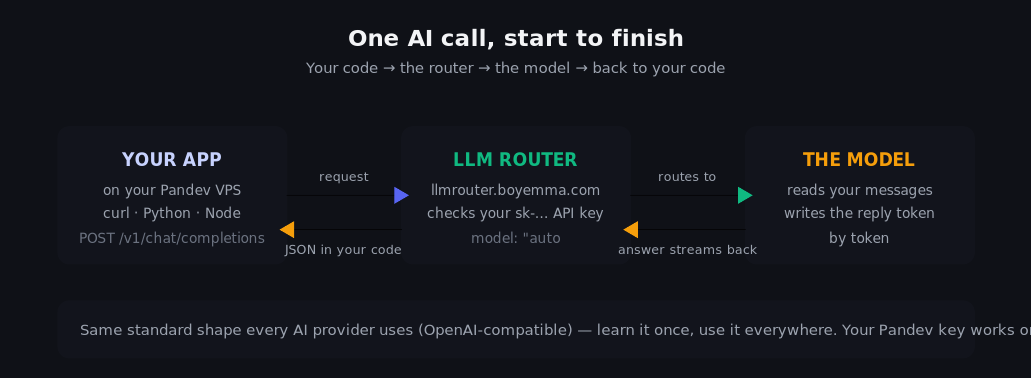
API = a set of rules for asking a program to do something for you over the internet. You already use one every time an app "loads." An AI API works like this:
- Your code sends a small message (usually JSON — structured text like a form) to a web address.
- The message includes: what the AI should say and who is asking (your API key).
- The AI writes an answer and the same connection carries it back.
- Your code reads the answer and does whatever you want with it.
That's the entire concept. Everything below is just learning the exact words for steps 1–3.
The chat-completion format (the only format you need)
Almost every AI provider on earth uses the same shape, invented by OpenAI and copied by everyone — including Pandev. You send a list of messages, each with a role and content:
{
  "model": "auto",
  "messages": [
    { "role": "system",    "content": "You are a kind English tutor." },
    { "role": "user",      "content": "What is the past tense of 'go'?" }
  ]
}- system — sets the personality/rules. Optional, very powerful.
- user — what you're asking.
- The reply comes back as a message with role: assistant.
"model": "auto" means the router picks the right engine for you — with Pandev's key, auto is the model you are allowed to call, so just always write "auto".
Your three ingredients
| Ingredient | Value |
|---|---|
| Endpoint | https://llmrouter.boyemma.com/v1 |
| Model | auto |
| API key | sk-… — you create it in 30 seconds below |
The endpoint is the web address your code sends requests to. The key is your ID card — it is what the router checks to see who you are and what you're allowed to use.
Step 1 — Create your key (free, instant)
Log into Pandev Desk → AI Tokens → Create my API key. That's it — no application, no waiting. The key appears exactly once:
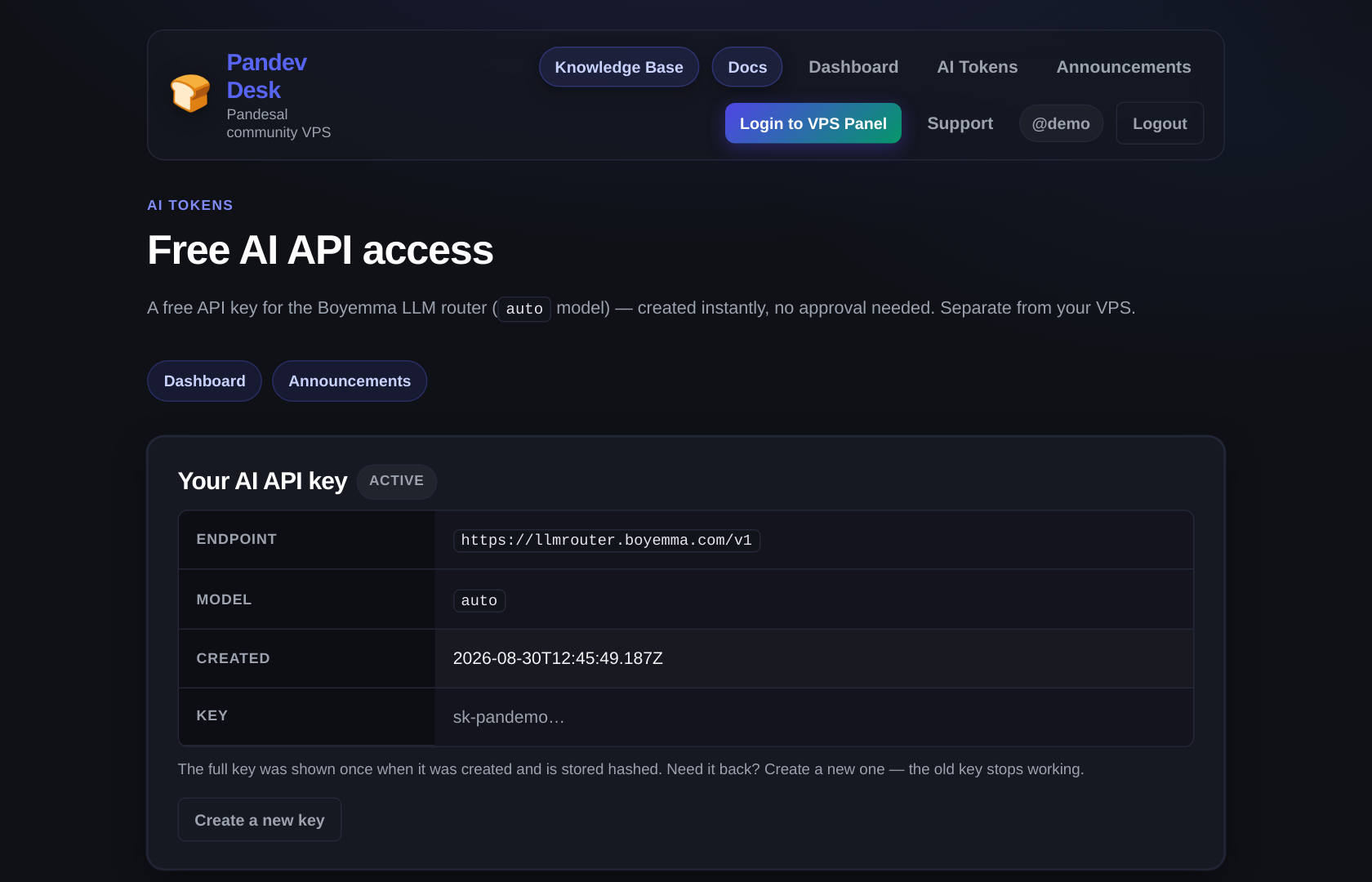
Copy it immediately into a safe place (a password manager, or a file you never commit). If you lose it, click Create a new key — the old one dies. This is by design: the site never stores the readable version, only a hash, so nobody (including staff) can "recover" it.
🔑 Key rules. Your key = your identity. Never paste it into a screenshot, never commit it to GitHub, never share it in Discord. Staff can suspend or terminate keys that get abused (spam automation, scraping floods, anything to annoy the service for others). A terminated key needs a moderator to approve a new one.
Step 2 — Your first call (30 seconds, no install)
Option A — the Chat Playground (zero setup)
If you are on this site as a logged-in member, open Chat Playground — it makes the exact same call this page teaches, live, and streams the answer token by token. Great for "what does this even look like."
Option B — curl from any terminal (the real thing)
curl is a command that sends web requests. Paste this (replace sk-YOUR-KEY with your real key — keep the quotes):
curl https://llmrouter.boyemma.com/v1/chat/completions \
  -H "Authorization: Bearer ***" \
  -H "Content-Type: application/json" \
  -d '{
    "model": "auto",
    "messages": [
      { "role": "system", "content": "Answer in one short sentence." },
      { "role": "user",   "content": "Explain what an API is to a 10-year-old." }
    ],
    "max_tokens": 120
  }'
You'll get JSON back that looks like this (real shape from this exact endpoint):
{
  "id": "chatcmpl-82fb1810328751f5",
  "model": "auto",
  "choices": [
    {
      "message": {
        "role": "assistant",
        "content": "An API is like a waiter: you tell the kitchen what you want, and they bring it back."
      },
      "finish_reason": "stop"
    }
  ],
  "usage": {
    "prompt_tokens": 20,
    "completion_tokens": 5,
    "total_tokens": 25
  }
}
The answer you care about lives in choices[0].message.content. The usage block counts tokens — pieces of words the AI thinks in (~1 token ≈ ¾ of an English word). On Pandev it's free; elsewhere usage is literally the meter your card gets billed on. Knowing to read it is already professional knowledge.
Option C — Python
pip install openaifrom openai import OpenAI
client = OpenAI(
base_url="https://llmrouter.boyemma.com/v1", # <- the only unusual line
api_key="sk-YOUR-KEY", # keep OUT of git
)
reply = client.chat.completions.create(
model="auto",
messages=[
{"role": "system", "content": "You are a concise coding tutor."},
{"role": "user", "content": "What does a for-loop do? One example in Python."},
],
)
print(reply.choices[0].message.content)Because the endpoint is OpenAI-compatible, the official OpenAI library works with just the base_url swapped — any OpenAI-compatible SDK in any language, plus tools that build on them. That's the beautiful part: one pattern, every provider.
That pattern is also how you get your free key into an AI coding tool — see "Use it inside an AI coding tool" below.
Option D — JavaScript / Node
npm install openaiimport OpenAI from "openai";
const client = new OpenAI({
baseURL: "https://llmrouter.boyemma.com/v1",
apiKey: process.env.PANDEV_AI_KEY, // read from environment — never hardcode
});
const reply = await client.chat.completions.create({
model: "auto",
messages: [
{ role: "system", content: "You explain things with short analogies." },
{ role: "user", content: "What is a database index?" },
],
});
console.log(reply.choices[0].message.content);🔐 The pro habit — keep keys out of code. Read them from the environment (
process.env.X) or a file you add to.gitignore. A key that appears in a public GitHub repo is a key that gets abused within hours — bots scan for leaked AI keys constantly. On your VPS the same rule applies: store it in/etc/pandev-bot.envwithchmod 600, not in your script.
Use it inside an AI coding tool
Here is the part most members actually want: instead of pasting code back and forth yourself, point a coding agent at this key and let it edit, run, and fix files on your behalf.
The general rule: any tool that lets you set a custom OpenAI-compatible base URL plus your own API key will work with this key. That covers VS Code AI coders, terminal pair-programmers, Python and Node SDKs, and most agent frameworks. The tool talks to /v1/chat/completions exactly like the curl above — it just does the typing for you.
The three things you paste
No matter which tool you open, it comes down to the same three fields from Your three ingredients:
- Base URL / endpoint —
https://llmrouter.boyemma.com/v1 - API key — your
sk-…key - Model —
auto
Some tools also have a separate "model ID" field that defaults to something like gpt-4o-mini. That is the one people miss: set the model ID to auto as well, or the request comes back 403.
Named tools that work
- Kilo Code (VS Code). In its provider/API-key settings, pick the OpenAI Compatible provider and paste the three fields above.
- Cline (VS Code). Same idea — choose its OpenAI-compatible API provider, then base URL, key, and
auto. - OpenCode (terminal AI coder). Add a custom provider in its config with
baseURL,apiKey, and a model ID ofauto. Exact field names and file location move around between versions, so check OpenCode's own docs for the current spelling — the values are the three above. - Aider (terminal pair-programmer). Set
OPENAI_API_KEYand pass--openai-api-base https://llmrouter.boyemma.com/v1, then ask for the model asauto. If Aider rejects a bareauto, try the prefixed formopenai/auto— theopenai/part is only Aider's own way of picking which dialect to speak; it strips the prefix before sending, so the server still receives plainauto. That one is worth a try rather than a guarantee; Aider's own docs have the current syntax. - Hermes Agent and OpenClaw. These are agent frameworks / CLI assistants — the kind of thing this community runs on a VPS — that accept a custom OpenAI-compatible endpoint and key, so the same three fields go in. Exact config keys and file names are theirs to document, so follow their own docs and paste in the three values above.
- Codex-style tools. Pandev's endpoint answers both
/v1/chat/completionsand the newer/v1/responses, so tools that speak either dialect work — same base URL, same key, sameauto. If the tool lets you pick which dialect it speaks and one fails, switch it to the other.
Side note: a coding agent that lives in the terminal can run on your VPS instead of your laptop — which is exactly what makes the pairings at the end of this section worthwhile.
The quick table
| Tool | What it is | How you point it at Pandev |
|---|---|---|
| Kilo Code | AI coder inside VS Code | OpenAI Compatible provider: base URL + key + auto |
| Cline | AI coder inside VS Code | OpenAI-compatible provider: base URL + key + auto |
| OpenCode | AI coder in the terminal | Custom provider in its config: baseURL + apiKey + model auto |
| Aider | Pair-programmer in the terminal | OPENAI_API_KEY + --openai-api-base + model auto (or openai/auto) |
| Hermes Agent / OpenClaw | Agent framework / CLI assistant | Its own config: OpenAI-compatible endpoint + key + auto |
| OpenAI SDKs (Python, Node, others) | Your own code | Swap base_url / baseURL — see Options C and D above |
Caution
Limits worth knowing first No embeddings. This key has no embedding models, so a tool whose whole feature is indexing your codebase into vectors will not be able to build that index. Tools that simply send your open files and the current conversation as text work fine.
Tip
One model, and patience The model picker in any tool will only ever show auto, and asking for any other name returns 403. auto is also a reasoning model — it can sit for tens of seconds before the first word, especially cold, because it is thinking first. Prefer tools that stream, and don't panic-quit a slow answer.
Important
If you see a 429, it is not you A 429 saying no deployments are available means the shared backend is full, not that your key is broken — tools with automatic retry ride it out, and so should you. And the non-negotiable: never commit the key to a repo. Put it in a .env file on your VPS, chmod 600 .env, and add .env to .gitignore.
Good pairings with your VPS
- A coding agent on the box it works on. Run OpenCode, Aider, or Hermes Agent on your Pandev VPS with the free key as its brain — it edits and runs the code where the code already lives, and it keeps working after you close your laptop.
- Your own Discord/Telegram helper. These frameworks exist to front a chat channel with an agent, so the club bot that answers homework at 2 AM can be a config change rather than a codebase — check each tool's docs for which channels it supports, then point it at this key.
- A cheap habit that lasts. Cheap and always-on is the whole reason people stay with the terminal tools: one key, one box, and whatever you build on it is yours.
Step 3 — Streaming (watch the answer type itself)
Default calls wait until the whole answer is ready. Real chat apps stream — tokens arrive as they're generated. Add "stream": true and the response arrives as a sequence of small "SSE" chunks instead of one big JSON. Every SDK handles the plumbing for you (in Python/Node: stream=True / stream: true, then loop the deltas — the Chat Playground page does exactly this against the same endpoint, so open the browser dev-tools Network tab on it to watch the frames land).
What can you actually build with it?
- A study buddy on Discord. A bot that takes any question and answers it with the free key — the classic first project.
- Homework checker / summarizer. Paste notes, get flashcards back. The system message does the style work.
- Translate & clean text. Formal ↔ casual, Taglish ↔ English, messy logs → bullet points.
- Smart search for your stuff. Ask "which files mention the project deadline" style questions over notes you own.
- Game NPCs with dialogue. Small text-generation loops are perfect for it.
- Data extraction. Give it messy text (receipts, forms), demand strict JSON back — models are good at it.
- A Telegram/Discord auto-responder for your club. Pair with rules in a system message.
The dream combo: VPS + AI API
This is where it all clicks together:
- Your Pandev VPS is the always-on body: runs the bot, opens to Discord/Telegram, hosts the web app, stays alive when your laptop closes.
- Your AI key is the brain the body calls:
/v1/chat/completions, modelauto, streamed answers.
Discord user DMs your bot
   → bot on your VPS receives it
   → VPS calls llmrouter.boyemma.com/v1 with your sk- key
   → answer streams back
   → bot replies in under a second
Run the bot as a systemd service (a "keep it running forever + restart on crash" wrapper — one 10-line file) and you've built a real, always-on AI product with zero budget. That's the whole trick that people pay cloud companies for.
Policies that keep this free
- One key per member, issued instantly on the AI Tokens page — separate from your VPS account status.
- Fair use, no abuse: automated scraping floods, spam generation, selling access, or anything that degrades the service for the community → staff suspend or terminate the key (and repeat abuse can reach your account under Warning → Freeze → Removal).
- Suspended key: can't call; a ticket can restore it. Terminated key: a new key needs moderator approval via the request form.
- Keys are stored hashed (only shown once). Lost = re-issue.
Troubleshooting the classics
| Symptom | Meaning & fix |
|---|---|
401 / "Key is blocked" | Wrong copy-paste (missing character), or staff blocked it — ticket to ask. |
403 mentioning allowed models | You asked for a model your key isn't scoped to. Use "model": "auto". |
429 | You fired too many requests at once — add a short sleep/retry loop. Bots with setInterval love doing this. |
| Slow first answer | Normal cold-start behavior; keep sessions alive or stream. |
| JSON error on the command line | Quoting — on Windows curl.exe needs double-quotes " around the -d payload, not single quotes. |
Empty content | Some answers come with long "thinking" first; lower max_tokens only if you're cutting it off mid-sentence — the model itself is fine. |
What's next
- 🖥️ You need somewhere to run these bots 24/7: KVM VPS 101 →
- 💬 Try it before code: Chat Playground
- 📚 Portal reference: Member guide · all guides: Knowledge Base